Tuesday, November 8, 2011

Apple's new iPhones are having some stumbles out of the "battery gate"

Apple's new iPhones are having some stumbles out of the gate: recently the new iOS 5 was revealed to suck down more battery than anyone predicted, and the voice-command feature, Siri, became so popular it seems to have stunned Apple's servers.
Apple's response to one problem, but not the other, is typical of the company. I think Apple did the right thing with the battery-life issue, but I'm frustrated by its lack of a public explanation for the Siri problems—and yes, the two issues are different and require different approaches.

The iOS 5 battery drain problem seems to be a complex interaction between a phone's software, a mobile network, and location. We've seen bugs like this on phones before; remember how some of Samsung's Galaxy S devices initially had serious GPS flaws? It can take a while to pinpoint where the problem lies.
Apple reacted here with deliberation and thoughtfulness. The company didn't freak out or say anything rash. It monitored the complaints for a few days, made some calls to affected consumers to get more details, clearly went back into the lab to find out exactly what was causing the problem, and issued a statement that a fix is coming.

I can't see what more people could have asked for here—but I understand why they wanted more, and I'll get to that in a moment. Apple is a bunch of humans, in a building, hopefully working no more than 12 hours a day, with a lot of products in the pipeline. They heard about a bug, they double-checked before saying anything, they found the bug, they're fixing the bug. Case closed.

The recent problems with Siri, on the other hand, are a lot less difficult and ambiguous, because they're entirely under Apple's control. Siri is a service operated by Apple. It's being overloaded under the weight of its popularity. This is similar to the Mobile Me fiasco of 2008.

Unlike with a complex handset bug that needs lots of testing to verify, it's relatively easy for Apple to know its servers are overloaded and issue some sort of quick statement, for instance: "The tremendous popularity of Siri has led to stress on our servers. We are adding capacity to resolve the problem, but for now, be aware the service is in beta."

In a curious twist, Apple seems to have been tweaking Siri's error messages to make her explain herself, telling Apple blogger John Gruber that "my mind is going." That fits with Apple's strategy: if you have to admit the products are fallible, try not to admit their creators are as well.

Apple's Counterproductive Mystique

Apple promotes its products as perfect objects produced by demigods. That is transparently false and in fact impossible, but it has worked for the company so far. That approach only becomes a problem when the human origins of Apple's gadgets turn into obvious bugs.

The company takes a very different approach to PR than other tech firms do. Apple execs generally don't speak at conferences, except when the conferences are run by Apple itself or by the company's special friends. They don't mingle with journalists or consumers on a regular basis, and they don't invite queries. The message is: our products are perfect enough to speak for themselves. That builds a mystique not just around the products, but around the creators. Apple's staffers hold themselves above and apart from the regular folks in the technology world.

The flip side of this approach, of course, is that when the products don't speak for themselves, consumers feel uncommonly let down. When the curtain is ripped away to reveal that their devices are just very good consumer electronics created by a bunch of smart but fallible humans, many people feel subtly betrayed. Consumers expect Apple's Olympians to be better than us, but of course, they aren't. They're just people. They make mistakes.

This marketing strategy is also why Apple's bugs get so much more press than other companies' bugs, by the way. When you promise perfection, any imperfection is news. When you call your products "revolutionary and magical," that's a high bar to set. Nobody else promises perfection quite to the extent Apple does.
I've always felt that Apple could do better by pulling back that curtain just a little bit. I remember when I asked an Apple exec, many years ago, about a missing feature in one of its products. The exec told me: we don't have infinite staff, we have to prioritize, it's a tough problem, it's on the list, we're working on it. If Apple said that about managing Siri's server load, I think most people would forgive the company. And if Apple said that about more things more often, I think Apple's critics would forgive it more often. Humans like to empathize, and Apple's marketing approach invites admiration and even worship for the company, but not empathy.

But who am I to criticize? Apple's strategy is stunningly successful because consumers are looking for something simple and perfect, something to pull them out of their difficult and complex lives, something handed down in beauty from the clouds. The company can clearly take a few blows to the chin to protect that mystique.

Thursday, November 3, 2011

Popular smartphones Review- iPhone v. Blackberry

In the year 2011, it's become standard to own a cell phone that can surf the web, download music, and send texts in a matter of seconds. The two most popular smartphones among teens are the BlackBerry and the iPhone.

When the first iPhone / ipad Accessories came around in 2007, it was almost revolutionary.Adults and teens alike were fascinated by the touch-screen technology and the phone's various capabilities. Although the iPhone is fairly simple to use and many new users are familiar with iTunes as well as the app store, many argue that the phone itself is overrated.

A popular opinion about the iPhone is that the touch-screen keyboard is difficult to type with since the keys are spread apart. One of the more popular features of the iPhone is that it functions as an iPod complete with the iTunes store, which makes it simple to purchase music and add it to the iPod without the hassle of connecting it to a computer. Many users also agree that the internet browser is simplified, easy to navigate with, and rarely freezes.

A few years back, many viewed the BlackBerry as strictly a business phone, used by adults and multi-taskers. Today, it's one of the most popular smartphones among teenagers as well as adults. Many teenagers claim that the primary reason they had for purchasing one was to utilize an application that is complete with every BlackBerry -- BBM, or BlackBerry Messenger. The application almost resembles an instant messaging tool, and makes communication between other BlackBerry users simple. It's also free.

Several BlackBerry users also agree that although the interface of the iPhone is quality, BlackBerries can sustain a longer battery life and are less prone to breakage. The e-mail service also allows the user to manage more than one address, which is beneficial to e-mail users with several obligations. However, BlackBerry owners claim that the music application is more difficult to use than the iPod feature on the iPhone.

“I’d rather buy an iPod separately than use the music app on the BlackBerry,” said one tenth grader.
If you're looking into purchasing either a BlackBerry or an iPhone, you should consider what your priorities on your cell phone are. Also, the price of these devices should not be ignored, as both require a separate payment for internet usage and other services.

One 11th grader told us he would not be getting a smartphone any time soon. “My family is tight on money,” he said.

If you are in the market though, whereas the iPhone offers simplicity in watching movies, listening to music, and downloading apps, the BlackBerry is a more sophisticated phone meant for communicating with friends and family as well as keeping things organized.

Tuesday, November 1, 2011

How to Hands on with GarageBand for the iPhone and iPad

Apple's music-making app goes universal, presents compelling new features

It’s no secret around these parts that we’re pretty fond of GarageBand on iOS. Apple’s mobile music app hits all the right notes, appealing to newbie musicians and professionals alike, offering massive amounts of functionality behind the guise of an easy-to-use interface and playful instrument designs; it’s almost hard to believe the program has only been around since March.

Now, GarageBand is getting its first full update, and it’s a whopper: The app has gone universal, with a brand-new iPhone and iPod touch interface, and has added a bunch of new features, including custom chords for Smart Instruments, an Arpeggiator, new velocity settings, transposition, new time signatures, quantization options, and support for AAC and AIFF export.


I spent the morning playing around with GarageBand on both my iPad 2 / iPad Cases and iPhone 4; here are some initial impressions on the update.

Phenomenal cosmic powers… itty bitty living space

When I first got a chance to play with GarageBand on the iPad back in March, I had little expectation for an iPhone port. While the device's portable size makes it ideal for recording vocal snippets and guitar parts on the go, I was skeptical about the viability of GarageBand’s full feature-set on such a small device. I’d owned guitar and piano iPhone apps before, but found them severely lacking in actual usability, thanks to small screen space and poorly-done interfaces.

GarageBand's iPhone implementation retains every feature from its iPad version.

As of Tuesday, I am very happy to be completely, utterly wrong. Not only does GarageBand’s iPhone and iPod touch version make music creation, editing, and exporting a snap, but the folks on the development team have somehow managed to implement almost every single feature from GarageBand for iPad into the device, and without compromising on design or user experience, at that. (The only missing feature I could find was support for multiple keyboards on one screen—something that makes little to no sense on a device as small as an iPhone or iPod touch / Ipod cases.)

All your instruments from GarageBand for iPad are ready and waiting; all your settings, ready to be tweaked. The design team has made some very clever adjustments to compensate for the iPhone’s small screen: The instruments themselves take up the full length of the screen, saving a small amount of space for the toolbar, which offers all your controls, hidden in several nicely-defined menus.

To access alternate instrument styles, other instruments, or to return to your songs list, tap the upside-down triangle in the upper left corner. If you want to swap back to your song timeline for editing, tap the timeline button immediately next to it. This button is intelligent: When in timeline mode, the icon switches to that of the instrument you have selected; tap it again to return to instrument mode, and it will turn into the timeline icon again.

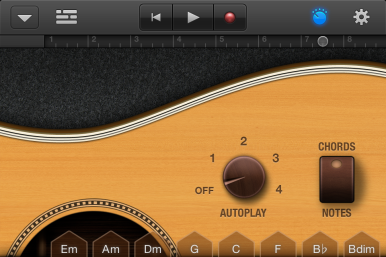
In the center, you have your standard play controls: A button for returning to the beginning of the song, one to Play/Pause, and one to record. Off to the right, there are one or two icons, depending on the complexity of your instrument. The first—the effects icon—appears only if your instrument has additional toggles that the iPhone simply doesn’t have space to display. (For example, the Autoplay knob and Chord/Notes toggle for the Smart Guitar.) Tap the icon, and the play area will slide down, revealing the extra controls.

Tap the effects icon on the iPhone, and the chords view will slide down, revealing extra controls.
I like everything about this implementation. For one, the effects area still provides you with some access to the instrument (or, in the case of Smart Instruments, their chords) so that you can try out effects without constantly switching views. In addition, the GarageBand designers have been able to have a bit of fun stretching the instrument design metaphor, which leads to really beautiful discoveries: Tap the effects icon while in Smart Guitar, for example, and as the chords slide down, so does the entire guitar, revealing the curve of the instrument.

The last icon in the toolbar—the ever-familiar gear icon—has been multi-purposed here into a single window for track, section, and song settings. (In the iPad version, all three have separate pop-overs.) Like the effects view, you can test out a tweak made without having to leave the screen by tapping the volume icon in the upper left corner; it’ll play a snippet from whatever you’ve been working on.

I didn’t have too much time to play around in GarageBand’s editing mode, but it, again, looks remarkably similar to its iPad cousin. You have full access to loops, support for cutting gestures, and the same eight-track limit for songs. Our full review of GarageBand 1.1 will likely take a closer look at the music-making process, but from the limited time I spent with it, I was incredibly impressed.

Instrument ch-ch-changes

GarageBand's custom chords feature lets you adjust any one of your Smart Instrument chords.
You’d think adding universal support to GarageBand would be enough for one update, but there are plenty of other tweaks. The program’s Smart Instruments—Smart Guitar, Keyboard, and Bass—now offer support for custom chords, something I’ve been itching for since its release. You can adjust any of the eight pre-formatted chords by tapping Edit Chords in the settings pop-over and test them on the fly; if a chord you picked doesn’t work well with the one next to it, you can just adjust it at will.

Smart Keyboard, Keyboard, and the Sampler get an Arpeggiator, a feature that sounds like it should be destroying things in a science-fiction film; in reality, the only thing it’ll destroy is your free time. Based on the synthesizer effect of the same name, the Arpeggiator lets you define a sequence by playing a chord, then proceeds to create an arpeggio from that input. You can add a varied octave range (from one to four) for your arpeggio, change the note order, and alter the speed and note kind (1/4 - 1/32 note, dotted, or triplet).
Those who like velocity-based instruments—Drums, Smart Keyboard, and the Sampler among them—will be happy to hear that there are now some rudimentary controls for adjusting sound. Because your iOS device doesn’t have a pressure-sensitive screen, GarageBand uses the velocity of your touch to imitate force. The Velocity Sensitivity setting offers four options: High, Medium, Low, and Off.

You can transpose tracks made with the Keyboard, Smart Keyboard, and Sampler.From my experience, off presents a default forte) sound with every tap; Low seems to more-or-less provide the same sound as when off; Medium offers two distinctions between taps, forte and piano; and High offers forte, mezzo-piano, and piano options. In English: Off—Loud; Low—Loud; Medium—Loud and Soft; High—Loud, Medium-Soft, and Soft.

Other instrument features include a transposition option for the Keyboard, Smart Keyboard, and Sampler: If you’re unhappy with your track, or want a different sound, you can adjust it by half-steps and octaves. And if you’re a drum enthusiast, you’ll also find a new switch in settings to separate the bass drum from the cymbal.

General tweaks

GarageBand’s instruments have gotten most of the new goodies in this update, but there are a few new general features out there, too: Two new time signatures, 3/4 and 6/8, join the default 4/4; you can change your song’s key without automatically transposing your other tracks to the new key; and new quantization options allow you to correct your song’s timing with swing and triplet notes. Finally, you can export your finished song in two new formats: AAC (from low-quality 64 kbs to iTunes Plus-quality 256 kbs) and uncompressed AIFF.

In short: This is a huge update. I spent several hours digging around, and even then, I feel like I’ve barely scratched the surface of what it has to offer. I certainly like what I see, though, and can’t wait to dig around a little more. Who knows? There might even be some treasure lurking beneath the surface. For that, you’ll have to stay tuned for Macworld's full review of GarageBand 1.1, coming soon.

Sunday, October 30, 2011

Review iPhone 4S battery life problems: bug in location services suspected

A flaw in Apple's location services system in its new iOS 5 software is increasingly suspected of being the cause of rapid battery drain for some owners of the iPhone 4S.

A growing number of people have found that the "Setting Time Zone" element of the Systems Services within the broader Location Services product seems to be operating even when there is no chance that the user would have moved to a different location or time zone. An icon beside the setting, which indicates whether it has been used in the past 24 hours, suggests that it is running repeatedly to access the phone's location even when there is no apparent reason to do so.


Location services can prompt large drains on any smartphone's battery: they use a combination of the Wi-Fi network name, where available, plus mobile mast data and GPS sensor input, to calculate the phone's position. The mobile mast data, for example, is usually calculated by comparing the strength of signals from the three nearest phone masts and triangulating against them. However if such a calculation is made too often, by polling the masts, it will begin to use battery power unnecessarily.

On iDownloadBlog, Oliver Haslam suggests: "it appears that iOS 5′s GM release introduced a bug that causes the Setting Time Zone function to keep the location tracking circuitry running constantly, draining battery power considerably. Switching it off may mean that your iPhone will no longer set its own time zone when you travel, but that's a small price to pay for having your iPhone last more than 12 hours on a full charge… We have tested this method on 4 different iPhone 4s handsets, including an iPhone 4 and an iPhone 3GS. All have reported drastically improved battery life after switching 'Setting Time Zone' off."
Some commenters have suggested they see little difference, but the purple icon beside the setting indicates that it is active - and for many people will have been active during the past 24 hours.

Apple's use of location services is deeply integrated into the iPhone 4S and iOS, but others have suggested that it is consuming too much battery power. "Two years working with dedicated GPS units taught me to be extremely careful with GPS settings: [it] kills battery very fast," David Hamilton, a web and Java consultant, remarked on Twitter.

Discussions on Apple's support boards are still raging over what specifically could be draining the battery so much more rapidly. Apple has not so far made any comment, but the Guardian reported on Friday that its engineers have begun contacting some people who have been reporting exceptionally rapid use.

The Guardian's own latest tests on an iPhone 4S found that it achieved 36 hours of battery life with a mixture of Wi-Fi, mobile data, and combined use, including 6 hours' using apps, phones, browsing and some location services. The majority of that included having the "Setting Time Zone" tab activated. There is no data yet from the ongoing tests about what effect disabling it has had.

Thursday, October 27, 2011

Apple Review: Will Apple's TV Set Be Powered by Siri?

As soon as Walter Isaacson's biography of Steve Jobs hit the streets, buzz about a possible Apple television set has hit a fever pitched. The idea was renewed based on comments Jobs made that he had finally "cracked" the interface for such a device. Now a new report suggests that we may have already met that interface: Siri.

It's been less than a month since the new digital voice assistant on the iPhone 4S debuted to the public, but Apple may already have plans for it to feature as the controller of a connected TV. Nick Bilton, writing for the Times' Bits blog, says Apple engineers tried one thing after another in their search to simplify or do away with the remote control. After floating ideas like a wireless keyboard or iPhone control, they eventually had their eureka moment: just talk to it.

Although the report cites anonymous sources who say Apple has a television in the works, it's not clear if the information about Siri as a controller comes from them or is Bilton's speculation. It does seem like a logical move for Apple to include Siri in future products ipad Accessories iPad Cases , particularly any TVs it may be working on. However, it remains to be seen if consumers fully embrace it as a control mechanism or see it as a barely useful extra. In addition, integrating Siri would require a level of electronics that most TVs don't have, pushing the price up.

Apple executives have been planning a dedicated TV product since 2007, the report says, ever since the original Apple TV set-top box came on the scene. Of course, that product flopped, Apple itself started calling it a "hobby," and basically let it languish until late last year, when the stripped-down model was released and became something of a hit, thanks mainly to the $99 price.

Getting into the TV business isn't without its challenges, but Apple appears set on bringing its tremendously influential brand, along with iTunes, to the living room in a big way. The numbers certainly make it look attractive: Earlier this week UBS said an Apple TV could potentially ad $100 billion to Apple's value as a company, if it's a success.

When will the real Apple TV arrive? The Times predicts an announcement in 2012 with a product release in 2013, but that sounds absolutely nothing like Apple, which almost always launches products as soon as it unveils them. Credit Suisse put out a report earlier this week that said an Apple TV is still two or three years out, mainly because Apple still needed time to work out content deals.

The discussion of Apple TV had definitely moved from "if" to "when," though. Now all Apple has to do is deliver on a groundbreaking product that will shake up a broken industry and execute on a production and marketing strategy in a category it has no experience in. Again.

Tuesday, October 18, 2011

The Android Lifesaver: Best Android Home Security Camera WIIA 2.1

“Make no mistakes, home burglary is not something to be complacent about," says Carl Robinson, a home security kit expert . Home burglary murders are done because the person who accidentally interrupts a burglary in progress often causes the burglar to panic, leaving the burglar little choice other than to kill the eyewitness or go to prison.

The following are excerpts from the confession of triple home burglar murderer Matthew Hoffman given to Knox county Ohio police investigators on November 19, 2010:

“I parked my car in Howard and walked from there to the house. I got to the woods across the street from the house a little after midnight. I slept across the street from the house that night in a sleeping bag. I woke up at daylight. There were two vehicles parked at the house during the night, and I saw that the gray car had left. I went back to sleep until around nine on Wednesday morning. I stayed there until a woman left in a pickup truck. This meant there were no vehicles at the house. I walked across the street and tried to enter the front door, but it was locked. I then went in through the garage door. The garage door was not closed all the way so I slid under it into the garage. I kicked the door into the house from the garage. By this time it was approximately 10:30 a.m. Wednesday morning.


"I looked around the house to make sure no one was there. Even if I did not take anything, there was a certain amount of excitement in being in someone else's home without them being there. I was looking for anything of value that could be carried out easily, i.e. money, jewelry, etc. I did not find anything of any real value. I was getting ready to leave as I had been there approximately an hour, but someone pulled into the driveway. I was back in the bedrooms when she entered the house and was unable to exit without breaking a window and trying to jump out. I had brought my knife for a certain amount of intimidation in case I ran into someone and needed to make an escape.

"When she made her way back into the bedrooms I confronted her and made her get onto the bed lying face down. I believe that we were in her bedroom. I had a blackjack, I was going to try to knock her out. I hit her a couple of times in the head, but this would not knock her out. It was not doing the job, and I started panicking. The next thing that I knew her friend came into the bedroom. I have no idea when she got there, what she was doing there, and how she gained access. The other woman yelled at me, there were now two to deal with and I did not know what to do.

"I grabbed the knife that I had put down on the nightstand and stabbed the woman on the bed, through her back, twice. I chased the other woman down (Stephanie) and stabbed her a couple times in the chest. Instead of running out of the house, she had run into another bedroom. I believe this bedroom was for a girl due to the contents of the room. I then went back to the other bedroom where the first woman was located and stabbed her a couple more times. I could tell that both women were now dead.

"At this time I was in a total state of shock. I wandered around the house slowly coming to the realization of what I had done and how bad it was. During this time I killed the dog because it would not stop barking. After a while I came to the conclusion that I was going to dispose of the bodies and burn the house down.”
Robinson says, “Android Home Security Camera WIIA 2.1 is a 100% cellular covert surveillance camera system that keeps you out ahead of any home burglary or intruder occurrence. It detects a burglar by built in motion sensor and sends pictures instantly and directly to your personal cell phone when you are away from home and there is a break-in. Several of these Hoffman type murders happen every day, 365 days a year to the horrible surprise of home owners and apartment dwellers all across America. If you don’t think a Hoffman type murder can take place at your home – think again – and think in the real world. At a minimum a home burglary happens somewhere every 8.5 seconds.

“The Hoffman triple burglary murder, kidnap and rape took place in Knox county Ohio, on November 10, 2010. Before that day was over, Hoffman, a 30-year-old unemployed ex-con, had killed Herrmann, her 11-year-old son, Kody Maynard, and Herrmann's best friend and neighbor, 41-year-old Stephanie Sprang," says Robinson. “He also had kidnapped a 13-year-old girl, sexually assaulted her and held her hostage until authorities, after days of old-fashioned police work, raided Hoffman's home near downtown Mount Vernon, Ohio about 8 a.m. the following Sunday morning and rescued her.”

Related Blogroll:

How To Choose And Use A Spy Camera Well – Topshoppingmall show you the guide

Home security: 5 Reasons you ought to Install Surveillance Camer

IP Network Cameras – Keep an safty Eye on You Business and Home

IP Surveillance Technology – Security Cameras Watch your home

Expert tips to bamboozle a burglar and safeguard your home

Top-shoppingmall show Top Tips for Buying Home Security Cameras

Friday, October 14, 2011

Design simplicity is the key for Windows 8 popular Windows feature: the task manager

Design simplicity is the key for Windows 8, and Microsoft recently discussed on its blog yet another popular Windows feature getting streamlined in Windows 8: the task manager. The new task manager echoes the design simplicity Microsoft was showing off earlier with the new copy file dialog.

Microsoft says three goals guided development of the new task manager, which is intended to appeal to non-techies and power users alike. The company says it wants to create a task manager that is optimized for common tasks (killing apps and processes), using a modern and functional interface, but without cutting out the favorite functions of power users.

For most users, the result is that Windows 8 won't inundate you with a long list of unfriendly-looking processes like the task managers in Vista and Windows 7. Instead, the new OS shows a simplified list of programs that you can expand if you need to go beyond simply killing an app.

A Simpler Task Manager

After studying user habits in Windows 7, Microsoft found that 85 percent of all task manager usage centers around the Applications and Processes tabs. This discovery isn't that surprising since most people use the task manager to simply kill off an application or process that isn't responding.

 
Force Quit Dialog in OS X 10.5, Leopard. Source: Macworld
 
So instead of seeing a long list of information you don't need, all you'll see when you open the Windows 8 task manager for the first time is a simple list of apps. You'll see no tabs, no menu bar, no statistics -- just apps. If a program is having a problem, a "Not Responding" note will appear next to the application name. This approach is similar to Apple's interface for killing applications in OS X.

Microsoft has simplified the basic task manager so much that you won't get a double prompt asking you if you're certain you want to kill a process. If you select the "End Task" button in Windows 8, the operating system will kill the process and the program will be told to shut down. Microsoft warns you to be careful with the new task manager, because Windows 8 won't prompt you ( toshiba PA3534U-1BAS battery   toshiba PA3536U-1BRS battery  ) to save your work before shutting something down.

Details, Details

Power users looking for a more information on what's going on in their system can still get it by clicking the "More details" button. This will open up a more familiar tabbed view for the task manager, but Microsoft has also made some important tweaks to this view as well.

First, all processes are grouped by type, such as which application they belong to, all background processes, or operating system processes. As with other Windows groupings, you can click on the left side of each app or process to expand the list and drill deeper into what your system is running. This will let you see, for example, how many Outlook windows are open or how many processes a specific service is running in the background.

Microsoft is also highlighting right at the top of the detail view percentages for CPU, memory, disk, and network usage. The top indicator for each category shows your overall usage, and then breaks it down by groups.

A heat map is also supplied to help you identify which applications are sucking up your system resources. The more CPU or memory an app uses, for example, the darker its statistics appear in the detail view.
Process names are also friendlier, by using common names for processes instead of cryptic terms such as "splwow64.exe." Did you know that means "Printer driver host for applications"? I sure didn't, but I will in Windows 8.

If adding friendlier names still doesn't help you understand why your printer driver host is causing problems, Microsoft is adding a "Search the Web" option when you right-click on a process. Clicking the search option will open your default browser to a search results page with information about the mystery process.
Microsoft has made some nice-looking improvements to the task manager and simplified its view for those who don't need it. But here's another interesting change: in the process of simplifying the task manager, Microsoft adds an extra tab in the detail view compared to Windows 7. How's that for simplification? more info at: http://www.top-shoppingmall.com/spy-cameras-1.htm